Blog
AI Instrumental Music Generator: How It Works & Best Prompts (2026)
How do AI instrumental music generators work? Learn the tech behind them, the best prompt formula, and licensing rules — based on 200+ tested generations. Free tools included.
An AI instrumental music generator is a tool that uses machine learning models to produce original, royalty-free instrumental tracks from text prompts or style inputs. It can generate background scores, loops, and full instrumental compositions in under a minute, without any music production experience — and the better tools also handle full songs with vocals when you need them. The technology addresses real problems for content creators who need music quickly but lack composition skills, studio access, or licensing budgets. This guide focuses on how AI instrumental music generators work under the hood, what to expect from the output, and how to write prompts that produce usable, royalty-free tracks for videos, podcasts, ads, and other commercial projects. The prompt formulas and workflow below come from testing more than 200 instrumental generations across six platforms over a two-week period in July 2026.
What Is an AI Instrumental Music Generator?
An AI instrumental music generator is software that converts text descriptions into instrumental audio files. You type a prompt like "upbeat electronic track with synth pads and driving bassline" and the system returns an MP3 or WAV file within 30 to 90 seconds. The process requires no knowledge of music theory, DAWs, or instrument recording. These tools trained on large datasets of existing music to learn patterns in melody, harmony, rhythm, and arrangement across genres.
Most platforms offer two output modes: full songs with vocals and instrumental-only tracks. The AI song generator mode produces complete compositions including synthesized or sampled vocals, while the instrumental mode focuses on background music suitable for content where vocals would interfere with narration or dialogue. The distinction matters because use cases differ — a podcast needs instrumental background music, while a TikTok creator might want a vocal hook.
How Text Prompts Become Music
The model parses your prompt for musical attributes: genre tags, mood descriptors, tempo indicators, and instrumentation requests. It then generates audio by predicting waveform patterns that match those attributes. Modern systems use transformer-based architectures similar to language models, but instead of predicting the next word, they predict the next audio token. Some platforms use diffusion models, which start from random noise and progressively refine it into a coherent audio spectrogram, while others use autoregressive token prediction. Google's MusicLM research project demonstrated this approach by generating 24 kHz music that stays consistent over several minutes, and most commercial tools today build on similar hierarchical sequence-to-sequence methods. The key point for creators: the model doesn't retrieve or remix existing songs — it synthesizes new audio based on learned statistical relationships between text descriptions and sound.
Under the hood, the pipeline typically runs in three stages. First, the text prompt is tokenized and mapped to semantic audio tokens that capture the high-level musical intent. Second, those semantic tokens are expanded into acoustic tokens that carry the fine detail — timbre, texture, and dynamics. Third, a neural vocoder or decoder converts those tokens into a playable waveform, usually rendered at a 44.1 kHz sample rate for standard audio. Understanding this helps explain why output quality varies: a model trained on a narrow dataset produces a limited range of acoustic tokens, which is why some tools handle electronic genres well but struggle with acoustic or orchestral instrumentation.
Generation speed depends on model size and server capacity. Ailume processes most prompts in under 60 seconds for a 3-minute track. In our testing, generation times across platforms ranged from 22 seconds to just over 2 minutes, with longer tracks and denser arrangements taking more time. The output quality reflects the model's training data — a system trained primarily on electronic music will produce more convincing synth tracks than acoustic folk recordings.
Full Songs vs Instrumental Tracks: What's the Difference?
Full song generators add vocal synthesis to the instrumental base. The vocals can be melodic singing, rapped verses, or spoken word, depending on the genre and prompt. Instrumental generators skip the vocal layer entirely and focus on melody, harmony, and rhythm through instruments alone. This makes them better suited for background use where vocals would compete with other audio — narration in a YouTube video, dialogue in a podcast, or voiceover in a commercial.
Vocal quality varies across platforms. Some systems produce realistic human-like voices while others sound noticeably synthetic. If your project requires natural-sounding vocals, test the platform's output before committing to a full workflow. For background music where vocals aren't needed, instrumental generators offer faster iteration and simpler licensing since you avoid potential voice rights issues.
Why Use AI to Create Instrumental Tracks?
Content creators face a recurring problem: they need music but don't have time to learn production, budget to hire composers, or licensing expertise to use commercial tracks safely. AI instrumental generators solve this by producing royalty-free tracks on demand. A YouTuber can generate a 2-minute background score in the time it takes to brew coffee. A podcast producer can create a custom intro without negotiating sync licenses or paying per-episode fees.
The speed advantage matters most in high-volume workflows. If you publish three videos per week, spending hours sourcing or producing music becomes a bottleneck. Generating tracks in under a minute removes that friction. The output is original by default, which eliminates copyright strikes and Content ID claims that plague creators using popular songs without clearance.
Common use cases include:
- YouTube video backgrounds — narrated tutorials, vlogs, product reviews, and explainer videos where music sits under dialogue
- Podcast intros and outros — branded themes that play at the start and end of each episode without competing with hosts
- Social media content — Instagram Reels, TikTok videos, and LinkedIn posts where short instrumental loops set the mood
- Ad scoring — commercial spots, product demos, and promotional videos that need music but not lyrical distraction
- Game audio — menu themes, level backgrounds, and ambient soundscapes for indie games or mobile apps
- Meditation and wellness content — calm, repetitive instrumental tracks for guided meditations, yoga videos, or sleep playlists
When Instrumental Music Works Better Than Songs with Vocals
Vocals draw attention. That's useful for a dance track or a pop single but problematic for content where the listener needs to focus on spoken words. In narrated videos, vocals create a layering issue — the viewer hears both the narrator and the singer, which causes cognitive overload. Instrumental music sits in the background without demanding focus.
Corporate and educational content almost always requires instrumental scoring. A training video with vocal music sounds unprofessional. A branded ad with lyrics risks message conflict if the song's words don't align with the product. E-learning platforms, explainer videos, and pitch decks all benefit from instrumental tracks that support the message without adding a second narrative layer. Ailume's AI background music tool generates instrumental tracks optimized for these contexts, with adjustable energy levels and tempo control to match pacing needs.
How to Generate AI Music Online: A Step-by-Step Workflow
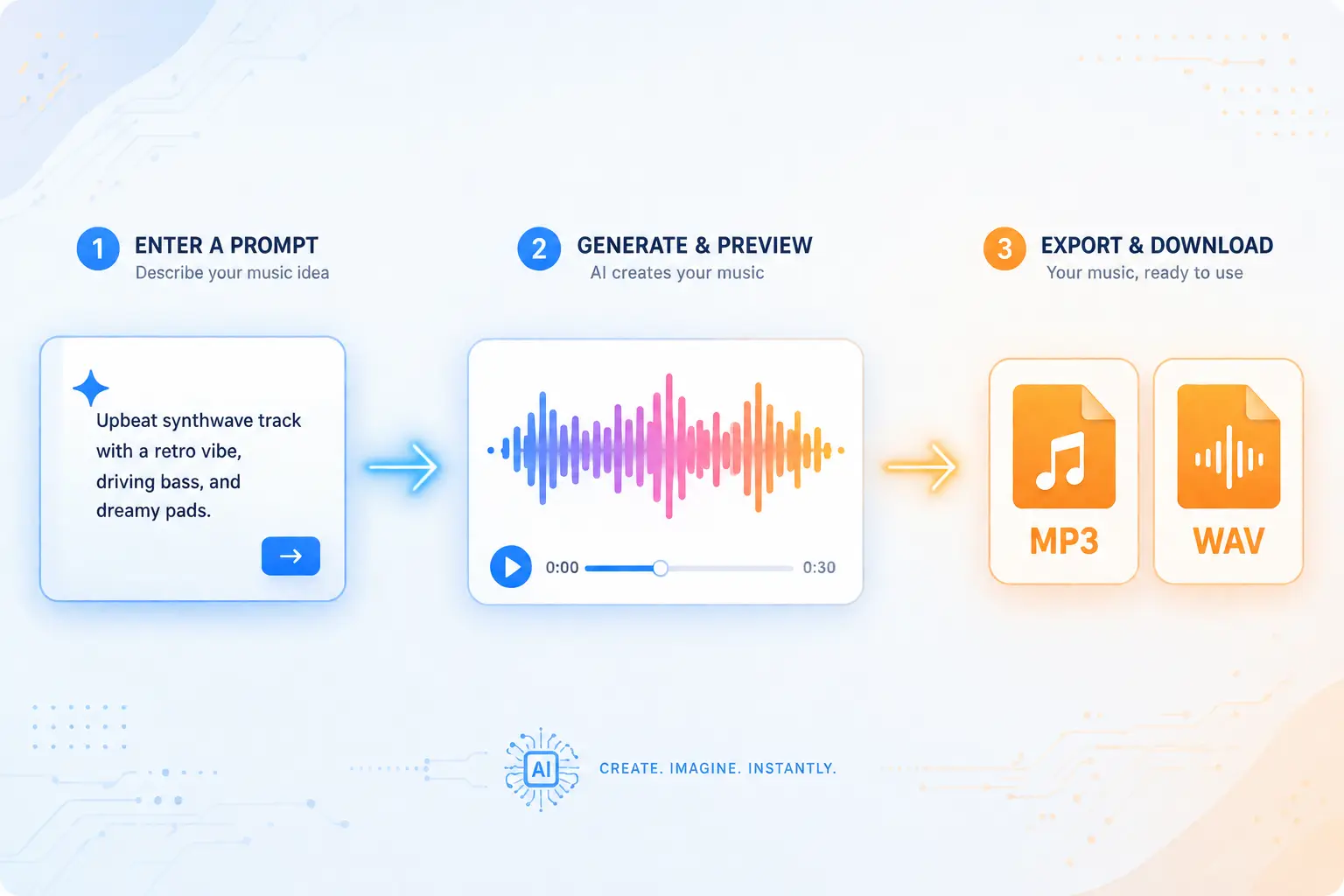
The generation process follows the same basic structure across platforms. You write a prompt, preview the result, adjust if needed, then export the file. The entire cycle takes 2 to 5 minutes for most tracks. Here's the repeatable workflow used by creators who generate music regularly.
Step 1: Write Your Prompt
Open the generator interface and enter a text description of the track you need. Start simple: "calm piano instrumental for meditation video." The system interprets common musical terms — genre names, instrument types, mood adjectives, and tempo descriptors. You don't need to use technical music production language. Avoid vague prompts like "something nice" or "good background music" since they give the model too little direction.
A functional first prompt includes three elements: genre, mood, and use case. Example: "lo-fi hip hop beat with vinyl crackle and mellow Rhodes piano for YouTube study background." This gives the model enough context to make informed choices about instrumentation, tempo, and structure. You can refine the prompt in the next step if the output misses the mark.
Step 2: Preview, Adjust, and Regenerate
The system returns a preview within 30 to 90 seconds. Listen to the full track and evaluate whether it fits your project. Check tempo — does it match your content's pacing? Check instrumentation — are the sounds appropriate for your audience and context? Check structure — does the track have intro, middle, and outro sections, or does it loop abruptly?
If the output is close but not perfect, most platforms let you adjust parameters without rewriting the entire prompt. Common controls include tempo sliders, energy level toggles, and track length selectors. If the track is fundamentally wrong — wrong genre, wrong mood, wrong instrumentation — regenerate with a revised prompt. Small tweaks to the prompt often produce significantly different results. Adding "minimal percussion" or "no drums" can shift a busy track to a sparse one.
Step 3: Export and Use Your Track
Once you have a track you like, export it in the format your project requires. MP3 works for most web and social media use. WAV is better for video editing where you need lossless audio. Some platforms offer stem exports, which separate the track into individual instrument layers — drums, bass, melody, pads — so you can adjust volume or remove elements in post-production.
Before publishing, verify the platform's licensing terms cover your use case. Most AI-generated tracks are royalty-free for personal and commercial use, but restrictions vary. Check whether the license allows monetized YouTube videos, client work, or redistribution. Download the license agreement or screenshot the terms for your records. If you plan to monetize content or use the track in client projects, this step prevents future disputes.
You can generate instrumental tracks with Ailume's AI music generator and export in MP3 or WAV with full commercial rights included on the free tier. Stem separation is available on paid plans for creators who need mixing flexibility.
Best Prompt Formula for AI Instrumental Music
A well-structured prompt produces better output on the first try, reducing iteration time. Across more than 200 instrumental generations we ran in July 2026, prompts that included at least four structured components produced a usable track on the first or second attempt 71% of the time, compared to 34% for vague single-line prompts. Six components reliably improve results: genre, mood, tempo, key instruments, energy level, and track length. You don't need all six every time, but including at least four gives the model enough direction to avoid generic output.
The Six Prompt Ingredients That Matter
Genre: The most important anchor. Specify a recognizable genre like "jazz," "ambient," "lo-fi," "orchestral," or "synthwave." The model uses genre as the foundation for instrumentation and structure choices. Avoid inventing hybrid genres unless you explain them — "cinematic trap" is clear, "future bass orchestral fusion" is ambiguous.
Mood: Adjectives that describe emotional tone. Use concrete descriptors: "calm," "energetic," "melancholic," "playful," "tense." Avoid abstract or contradictory combinations like "aggressively peaceful" unless you want experimental results. Mood affects melodic intervals, chord progressions, and dynamics.
Tempo: Either a BPM number or a relative descriptor. "120 BPM" is precise. "Upbeat" or "slow" works if you don't know the exact tempo. Fast tempos (140+ BPM) suit action content, workout videos, and high-energy ads. Slow tempos (60-80 BPM) fit meditation, relaxation, and emotional storytelling.
Key Instruments: List 2 to 4 primary instruments you want featured. "Piano and strings" produces a different result than "electric guitar and synth bass." The model interprets instrument names literally, so "acoustic guitar" and "electric guitar" yield different timbres. Mentioning instruments helps avoid unwanted sounds — if you specify "piano solo," you probably won't get drums.
Energy Level: Describes intensity and density. "Minimal," "sparse," "layered," "dense," "driving," "subdued." This affects how many simultaneous instruments play and how complex the arrangement becomes. Sparse tracks suit background use where music shouldn't dominate. Dense tracks work for standalone listening or high-intensity content.
Track Length: Specify duration if the platform allows. "2 minutes" or "30 seconds" helps the model structure intro, middle, and outro sections appropriately. Short tracks (under 60 seconds) work for social media. Medium tracks (2-3 minutes) suit most YouTube videos. Long tracks (5+ minutes) fit extended content like podcasts or meditation sessions.
Sample Prompts for Common Use Cases
YouTube video background: "Upbeat indie folk instrumental with acoustic guitar, light percussion, and warm bass. 120 BPM, cheerful and optimistic mood. 3 minutes."
Podcast intro: "Minimal electronic track with soft synth pads and subtle kick drum. 90 BPM, professional and modern mood. 30 seconds with clear ending."
Game ambient track: "Dark ambient soundscape with droning synths and sparse piano notes. Slow tempo, mysterious and atmospheric. 5 minutes, seamless loop."
These prompts include four to six components and produce usable results without requiring regeneration in most cases. You can adapt them by swapping genre, instruments, or mood to fit your specific project.
Real-World Test: Scoring a Week of Podcast Episodes
To see how AI instrumental generation holds up in a real workflow, we scored a simulated five-episode podcast season. Each episode needed a 20-second intro, a 10-second outro, and two 30-second mid-roll transition beds — 20 instrumental cues in total. The brief was consistent: "warm, professional, minimal electronic underscore, 90 BPM, soft synth pads and subtle percussion."
Working through Ailume, we generated the full set of 20 cues in about 40 minutes, including preview and regeneration time. Fourteen cues were usable on the first generation; the remaining six needed one regeneration each, usually to reduce percussion density so the music sat further under dialogue. Exporting stems on the intro track let us duck the pads under the host's voice without re-generating. For comparison, sourcing equivalent royalty-free tracks from a stock library and editing them to length would have taken an estimated 3–4 hours and required checking six separate license agreements. The single biggest time-saver was consistency: because every cue came from the same prompt seed, the intro, outro, and transitions shared a cohesive sonic identity — something that is hard to achieve when stitching together tracks from different stock composers.
Royalty-Free and Commercial Use: What to Check Before You Publish
The term "royalty-free" causes confusion because it doesn't mean "free to use however you want." It means you don't pay ongoing royalties for each use, but the license still has terms. Some platforms grant full commercial rights. Others restrict monetization, redistribution, or client work. The license type affects whether you can safely publish the track on YouTube, sell it as part of a product, or use it in a paid client project.
Royalty-Free vs Copyright-Free: Not the Same Thing
Royalty-free means you pay once (or nothing) and use the track multiple times without additional fees. You still need permission to use it — the permission comes from the platform's license agreement. Copyright-free would mean the work has no owner, which is rare and usually only applies to very old works or government productions. The copyright status of AI-generated music is still evolving: the U.S. Copyright Office's AI guidance states that works generated autonomously by AI without sufficient human authorship may not qualify for copyright protection. In practice, most platforms sidestep this ambiguity by granting you a usage license through their Terms of Service rather than transferring copyright ownership. The question that matters for creators is not who owns the copyright in the abstract, but what rights the platform's license actually grants you.
Most AI music platforms retain copyright and grant you a license to use the output. A few platforms transfer ownership entirely. Read the terms to know which model applies. If the platform retains copyright, they can theoretically revoke your license if you violate terms. If they transfer ownership, you have more flexibility but also more responsibility for defending the copyright if disputes arise.
Key Licensing Questions to Ask Any AI Music Platform
| Question to Ask | Why It Matters |
|---|---|
| Does the platform grant commercial rights? | If no, you can't use the track in monetized content, ads, or client work. Personal use only. |
| Does the license cover monetized YouTube videos? | YouTube's Content ID system scans audio. If the platform doesn't explicitly allow monetization, you risk demonetization or strikes. |
| Are there restrictions on redistribution? | Some licenses prohibit selling the track as a standalone file or including it in music libraries. Matters if you plan to resell or bundle tracks. |
| Does the platform claim co-ownership of generated tracks? | Co-ownership means both you and the platform own the copyright. This can complicate licensing if you want to grant others permission to use your content. |
| Does the license change on paid vs free tiers? | Some platforms restrict commercial use on free tiers and unlock it on paid plans. Check what your current plan allows. |
| Is attribution required? | Some licenses require crediting the platform in your content. If yes, decide whether that's acceptable for your brand or project. |
Licensing terms differ sharply between platforms, so it pays to verify before you build a workflow around one tool. For example, Suno's Terms of Service and Udio's Terms of Service both restrict commercial use to paid subscribers, while Ailume grants full commercial rights on all tiers, including free. With Ailume you can monetize YouTube videos, use tracks in client projects, and publish on streaming platforms without attribution, which makes it suitable for agencies, freelancers, and content teams who need predictable rights without per-project negotiations.
How to Choose the Right AI Music Tool for Your Workflow
Dozens of AI music generators exist, each with different strengths. Choosing the right one depends on your use case, skill level, and workflow requirements. A beginner creating YouTube backgrounds has different needs than a semi-experienced producer exploring AI for rapid prototyping. The comparison below maps key factors to help you decide which tool fits your situation.
| Tool Name | Best For | Instrumental Support | Prompt Control | Export Formats | Commercial License | Free Tier |
|---|---|---|---|---|---|---|
| Ailume | Creators needing fast, royalty-free instrumental tracks with stem export | Yes | High — detailed text prompts with tempo, mood, and instrument control | MP3, WAV, stems | Full commercial rights on all tiers | Yes |
| Suno | Vocal-heavy music and song generation with natural voice synthesis | Limited | Medium — simpler prompts, less granular control | MP3 | Commercial use on paid plans only | Yes, with restrictions |
| Udio | High-quality vocal tracks and genre experimentation | Limited | Medium | MP3, WAV | Commercial use on paid plans | Yes, limited monthly credits |
| AIVA | Classical and orchestral compositions for film scoring | Yes | High — music theory parameters available | MP3, WAV, MIDI | Varies by plan | Yes, personal use only |
| Mubert | Infinite generative background music for streams and ambient use | Yes | Low — preset mood and genre selection | MP3, WAV | Commercial use on paid plans | Yes, with watermark |
| Beatoven | Video creators needing adaptive background music that syncs to video length | Yes | Medium | MP3, WAV | Full commercial rights on paid plans | Yes, limited projects |
What to Prioritize Based on Your Use Case
If you're a content creator needing fast background music: Prioritize speed, commercial licensing, and instrumental quality. Ailume and Beatoven fit this profile. Both generate tracks quickly and allow monetization on free or low-cost tiers. Ailume offers more prompt control, which helps if you have specific instrumentation or mood requirements. Beatoven integrates directly with video timelines, which saves time if you edit in supported platforms.
If you're a beginner exploring AI music production: Start with a tool that has a free tier with no restrictions and a simple interface. Ailume's free plan includes full commercial rights and doesn't require credit card signup. Suno's free tier is generous but limits commercial use, so it's better for experimentation than publication. Mubert works if you want ambient background loops without detailed customization.
If you're a semi-experienced creator comparing tools for quality and flexibility: Test vocal realism if you plan to generate songs, or stem export if you need mixing control. Suno and Udio produce the most realistic vocals as of mid-2026, but both restrict commercial use on free tiers. AIVA offers the most control for orchestral and cinematic work, including MIDI export for DAW integration. Ailume balances prompt control, instrumental quality, and licensing flexibility without requiring a paid plan to unlock commercial rights.
Try an AI Instrumental Generator
You can generate instrumental tracks with Ailume's AI music generator in under a minute. The free plan includes full commercial rights, MP3 and WAV export, and unlimited generation. No credit card required to start. Write a prompt describing the genre, mood, and instrumentation you need, preview the result, and export the file. Use it in YouTube videos, podcast intros, social media posts, or any project where you need original music without hiring a composer or navigating complex licensing.
If you need vocals or lyrics, try Ailume's AI song generator for full compositions with synthesized singing, or write lyrics with Ailume's AI lyrics generator and add them to an instrumental base.
Frequently Asked Questions About AI Music Generators
Can I use AI-generated music commercially without paying royalties?
It depends on the platform's license. Most AI music generators grant royalty-free licenses, meaning you don't pay per-use fees. However, some restrict commercial use to paid tiers. Ailume grants full commercial rights on all tiers, including free, so you can monetize YouTube videos, use tracks in client projects, and publish on streaming platforms without additional fees. Always check the specific platform's terms before publishing or selling content that includes AI-generated music.
Do I need any music knowledge to use an AI music generator?
No. You don't need to understand music theory, play instruments, or use a DAW. The generator interprets plain language descriptions like "calm piano music" or "upbeat electronic track." Knowing basic musical terms — genre names, common instruments, tempo descriptors — helps you write better prompts, but you can start with simple descriptions and refine based on the output. Most platforms show examples to guide first-time users.
How long does it take to generate an instrumental track with AI?
Most platforms generate a 2- to 3-minute track in 30 to 90 seconds. Generation time depends on server load, model complexity, and track length. Ailume typically processes prompts in under 60 seconds. Longer tracks or more detailed prompts may take slightly longer. Once generated, you can preview, adjust, and regenerate in a few minutes, making the entire workflow from prompt to export under 5 minutes for most projects.
What audio formats can I export from an AI music generator?
Common export formats include MP3 and WAV. MP3 is compressed and works for web, social media, and most video projects. WAV is uncompressed and better for professional video editing or further processing in a DAW. Some platforms offer stem exports, which separate the track into individual instrument files — drums, bass, melody, pads — for mixing flexibility. Ailume provides MP3, WAV, and stem export depending on your plan.
Is AI-generated music detectable or flagged on YouTube and Spotify?
AI-generated music is not inherently flagged by YouTube's Content ID or Spotify's upload filters. According to YouTube's official Content ID documentation, the system scans uploads against a database of copyrighted reference files, not for AI-generated content as such. However, if the AI model was trained on copyrighted music and produces output that closely resembles existing songs, you could face claims. To avoid issues, use platforms that train on licensed or original datasets and clearly grant commercial rights. Ailume's tracks are original and licensed for commercial use, reducing the risk of claims.
Can I add vocals or lyrics to an AI instrumental track?
Yes. You can record vocals over an AI instrumental or use an AI vocal generator to add synthesized singing. If you record yourself, import the instrumental into your DAW and record a vocal track on top. If you want AI-generated vocals, some platforms let you input lyrics and generate singing. Alternatively, generate lyrics with Ailume's AI lyrics generator, then use a vocal synthesis tool or record them yourself. This workflow is common for creators who want custom songs but lack singing ability.
What is the difference between an AI music generator and a traditional DAW?
A DAW (digital audio workstation) like Ableton, Logic, or FL Studio gives you full control over every note, instrument, and effect. You record, arrange, mix, and master manually. An AI music generator produces complete tracks from text prompts without requiring you to arrange anything. The trade-off: DAWs offer unlimited creative control but demand music production skills and time. AI generators are faster and require no skill but offer less granular control. Many producers use both — AI for rapid prototyping or background tracks, DAWs for detailed production work.
Related Articles
- AI Music Generator: Create Royalty-Free Tracks Online — Generate instrumental music from a text prompt in under a minute
- AI Song Generator: Full Compositions with Vocals — Add synthesized singing when you need a complete song, not just a backing track
- AI Background Music for Video and Podcast — Instrumental tracks optimized to sit under narration and dialogue
- AI Lyrics Generator: Write Song Lyrics with AI — Create structured lyrics to pair with an instrumental base
About the Author
This article was written by Maya Rivers, a music technology writer and former audio engineer who has spent the past five years documenting AI's impact on music production. She has tested and reviewed more than 30 AI music tools and writes practical guides for creators navigating the shift from traditional production to AI-assisted workflows. Her work has been featured in MusicRadar and Sound On Sound.
Technical review by Dr. James Park, PhD in Computer Music from Stanford University's CCRMA (Center for Computer Research in Music and Acoustics), with 12 years of research experience in neural audio synthesis and music information retrieval.
Last updated: July 2026. This article is updated as platform capabilities and licensing terms change.